Introduction
Bookmarks Tab is a Chrome extension that takes your bookmarks and displays them in a clean, cosy interface on your browser new tab, it brings the native mobile experience right into your browser, facilitates access and navigation to your bookmarks, providing you with a better browsing experience. Its core features are:
- Drag and drop bookmarks around.
- Enhanced bookmark navigation experience with smooth animations.
- Change the background image to nature scenes or upload your own.
- Easily edit, move, or delete your bookmarks.
This article aims to provide details on the extension development process, the kind of details that a screenshot and paragraph cannot usually summerize, whether you're an early-career or seasoned developer, I believe that you'll find something useful in this article.
Role and Purposes
Doing UI/UX
Since Bookmarks Tab aims to improve the user experience with bookmarks, my work wasn't exclusively development, I had to step outside my wheelhouse and handle UI/UX design, and to be honest, design decisions can be as challenging as technical ones, a single feature can be designed in multiple ways, take the folder navigation as an example:
I had to choose between the design shown in the video and using a shared element to display bookmarks inside a folder. I went for the shared element solution at first as it's similar to mobile experiences, but it was a tricky design, especially for nested folder navigation.
Why Bookmarks Tab?
I'm a big fan of mobile interfaces, if I wasn't doing web, I would've been a mobile developer, I do really want to do some React Native in the future. The thing that attracts me most about mobile devices is the small touchable screen.
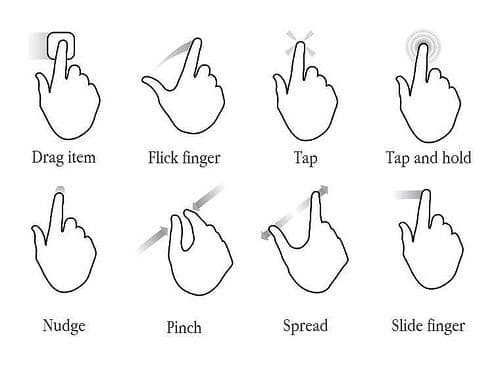
touch gestures allow for a high-level of interactivity, and small handheld screens are perfect for smooth animations and delightful designs, consider something like drawer components, it's much easier to interact with a drawer using your finger than a mouse or trackpad.
I built this extension as an attempt to bring some of that friendly experience to the desktop browser, small app icons for websites, smooth animations when navigating, drag and drop capabilities.
A word on Extensions Development.
If you're not familiar with Chrome extension development, extensions are built using standard web technologies (HTML, CSS, and JavaScript). This means you can use any framework or library built on top of these three languages. In this project, I'm using React, Tailwind, and Shadcn. I'm also using CRXJS, a tool built on top of Vite for hot module reloading (HMR) and setup for extension development.
The main difference with extensions is that they run in different contexts than regular webpages such as popups and background scripts, and access browser APIs that regular websites cannot use, one of those APIs is the Bookmarks API (chrome.bookmarks), I use this API to read, search, and manage user bookmarks, I also use an extension-specific storage API, it's similar to web storage API localStorage, except that it can get unlimited storage quota by requesting the "unlimitedStorage" permission.
Drop and Drop
The drag and drop UI was the most complex part in this project, bugs kept popping out of nowhere, I suddenly found myself dealing with collision detection algorithms, pointer events, layout shifts, scrollable containers, and a nightmare of useRefs to track all UI changes that could affect the drag and drop behavior. All that effort just to allow users to move something from point A to B.
One of the trickiest parts about this drag and drop UI is handling user scroll. I've ran into so many edge cases, like the user scrolling down and then dragging and an item upward, or moving from a non-scrollable to a scrollable container, absolutely positioned element being removed from the normal document flow, and so on. I tried to be as defensive as possible with this, though I can't really guarantee that some silly weird bug isn't hiding behind an edge case I didn't consider.
After around two months of daily usages, I came across two bugs regarding the functionality, the first one is a breeze to fix, it's related to position: absolute; removing the dragged element from the normal document flow, but the second one is something I haven't figured out its cause yet, I'll give this a deeper inspection when I'm free.
Believe it or not, I didn't use a library for this, I hand-crafted the feature, the library that would best suit this feature is dndkit, dndkit is an awesome tool, it doesn't use the infamously inconsistent HTML5 drag-and-drop API, it builds its own one based on pointer events, handles collision detection, sorting, motion restriction, it supports Mouse, Touch, and Keyboard drop and drop.
The Problem with Dndkit
However, this powerful API makes the ease of use of the library challenging, which is exactly why I couldn't incorporate it in my project. After reading almost the entire docs, experimenting with the library capabilities, I concluded that the only way for me to make use of dndkit is to head to the github repo and read the underlaying library code to understand how I could embrace it to build such complex feature, which I believe is much more work than crafting the UI by hands.
The Dialog Element
My extension is full of floating UIs (the background image carousel, edit bookmark dialog, search), despite that, I don't use any of Shadcn floating components (context menu, dilaog, etc), I use the native html dialog element instead, I learned about this element just recently and wanted to experiment with it, and you trust me,you really want to give it a try.
The dialog element manages focus trapping, provides you with a backdrop, handles both the Escape key and light dismiss, and supports form dialog, moreover, its baseline state on MDN says that it's widely available across major browsers.
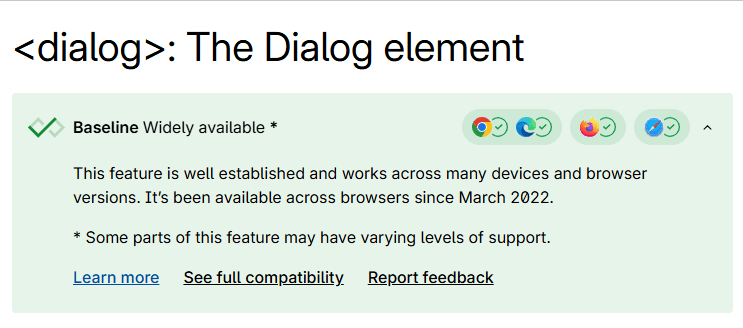
Despite all of these advantages, UI libraries like ShadcnUI and RadixUI choose to throw away this built-in, vendor-tested solution that browsers offer for free, and create their own diloag using div role="dialog", you can already guess how much Javascript you'll need to ship to the user in order to make a meaningless div act like a dialog, and guess what? it doesn't always get to fully behave like a true dialog.
Here's something that JavaScript dialogs can't do, the html dialog element can be closed using swipe gestures and back button on mobile devices. I had an aha moment when I first learned about this, this addition makes web dialogs more standardized and in line with native mobile apps, unifying the user experience across different platforms.
Imagine you open a dialog on your mobile browser, then you pressed the back button, what do you expect to happen? Do you expect the dialog to close or the page to navigate back to the previous URL?
I would personally wait for a dialog close because that's the experience I get everywhere else on my mobile device, for example, if I try to delete a message on WhatsApp or Telegram, I'll get a confirmation dialog that can be closed with a back move.
However, if you're on the wide, messy web, you can't tell what's going to happen when you move back unless you actually try to. It depends on whether the website uses the native element or implements its custom dialog solution.
Extension Current State
Bookmarks Tab is currently in its early stage, I've tried to implement as many key features as possible, though it still lacks a few things, such as changing folder colors, adding user settings, integrating Google Search, and supporting keyboard navigation.
I'll do my best to add these features as soon as possible, since I use this extension myself, but I'm quite busy these days, so I can't promise they'll be implemented quickly.